XR18
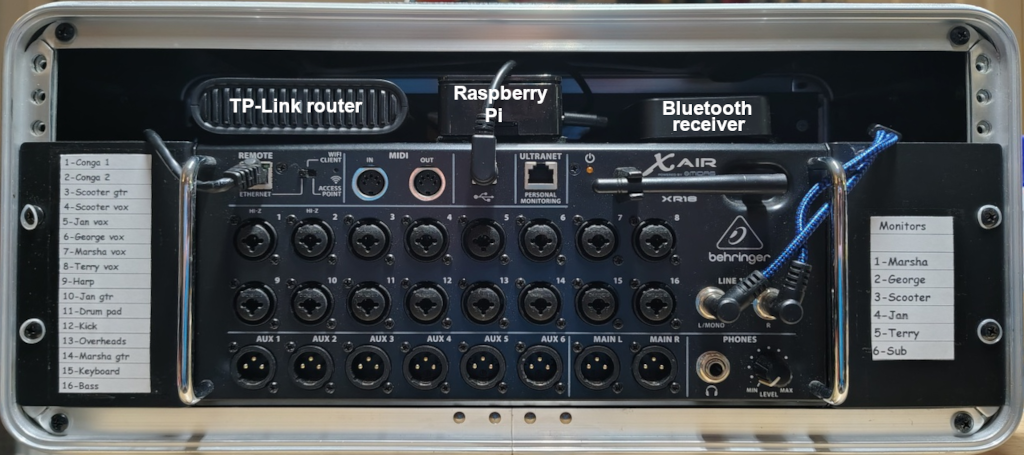
What's not to like about the XR18? Incredibly affordable ($500 at this time), 16 mic channels, 1 stereo channel, 6 aux sends (in our case 5 monitor mixes and subs on aux), tiny and lightweight, built-in effects (4 active), per channel EQ (parametric with adjustable Q), compression, noise gate, the ability to save and restore as many venue settings as you want, control everything from a phone or tablet, control your own monitor mix from a phone or tablet, built-in router (never, ever use the built-in router - it sucks), Ethernet connection, USB connection for recording 16 tracks... One other thing that really works for me is that there are no faders or knobs to bump while carrying it around (other than the headphone knob which we don't use).
The XR18 in the above picture is housed in a 4U rackmount case along with the router, Raspberry Pi, and the bluetooth receiver. The router is connected by the internet cable on the left, the Raspberry Pi with the old school USB cable, and the bluetooth receiver with the two blue cables on the right. The rackmount case is available from Amazon for a very reasonable cost. Seismic Audio makes nice ones but the generic ones are just as good and a third less expensive. The above rack, loaded, weighs about 20 pounds so I don't have to break my back to haul around the PA.
The TP-Link travel router costs about $45 on Amazon and works like a champ. One thing that you need to do no matter what router you buy - reserve the XR18 IP address so that it always gets the same one. I gave it 192.168.0.2. You can find out online how to reserve the IP address for your particular router. The most frequent complaint about the XR18 that I see is that users can't find the thing when using the included software on their tablet. That's because they let the router use DHCP to select a random IP address. You know what the doctor said when the patient said "It hurts when I go like this" - "Don't go like that!".
In addition to not using the internal router and reserving the IP address for the XR18 there is one other thing that you need to do, or not do, actually. Don't use Behringer's free software to control the router. It was very well-written software when it was written but Behringer decided that they didn't need to have a contract with the developer to keep it up to date. The guy that wrote it has his own new app for running the XR18 (and a bunch of other digital mixers - Allen & Heath, Mackie, Midas, Presonus, Soundcraft...). It's called Mixing Station. It costs about five bucks for a tablet or phone. It has a bunch of features that aren't available on the Behringer app. The one that makes it worth the price of admission is something called Re-gain. How many times have you been playing a gig when you notice that someone's mic or instruments has the gain setting too low? If you're playing a song and you need to adjust the gain you have two options - crank up the gain on that channel or do nothing until the song is done. If you crank the gain up the front of house goes up like you want but so does everyone's monitor mix. Now you have really pissed off, partially deaf bandmates. Not the best outcome. If you do nothing until the song ends you have to take time to adjust the gain on the channel and then manually adjust all of the monitor channels. In Mixing Station you just pull up the channel, double-click the gain setting, click the Re-gain button, adjust the gain, click the Re-gain button to turn it off, then adjust the FOH volume for the channel. When Re-gain is active, all output channels have the volume for that channel adjusted automatically to keep the same sound level. Voila, no pissed off, deaf bandmates! I've done this in the middle of a song and nobody even noticed.
We play a number of casinos around here and all of them use Behringer X32s and/or XR18s. They usually have an X32 for FOH and an XR18 monitor mixer. Buy one, set it up correctly, and you'll never regret it.